Square Gift Cards
Sell digital Square gift cards in WooCommerce and redeem them at checkout — one balance, tracked by Square, spendable online and at your POS.
Sell digital Square gift cards on your WooCommerce store and accept them as payment at checkout. Cards bought online are real Square gift cards: Square issues the card, holds the balance, and tracks every redemption — so the same card works on your website and at your Square POS, with one balance that can never drift out of sync.
No extra plugins are needed — gift card selling and redemption are built into the Square gateway.
How the balance stays correct
Redeeming a gift card at your checkout is a real Square payment against the card — the balance is debited in Square itself, never just discounted on the WooCommerce side. When a card covers part of an order, the gateway splits payment between the gift card and the customer's card on the same Square order; when it covers everything, no card entry is needed at all.
Requirements
- SquareSync for Woo Pro with the Square payment gateway enabled (Set Up Payments).
- Gift cards enabled on your Square account (Square Dashboard → Gift Cards).
Enable gift cards at checkout
- Go to WooCommerce → Settings → Payments and open the Square gateway's settings
- Scroll to Square Gift Cards and tick Enable Square Gift Cards as a payment method
- Save changes

This adds a Gift Card entry to your checkout (classic and Blocks) where customers enter their card number. The balance is checked against Square live, applied to the order total — including tax and shipping — and any unused balance stays on the card.
Sell gift cards: create the product
- Go to Products → Add New and give the product a title (e.g. "Gift Card")
- In Product data, choose the Square Gift Card product type
- Open the Gift Card Options tab and pick a pricing type
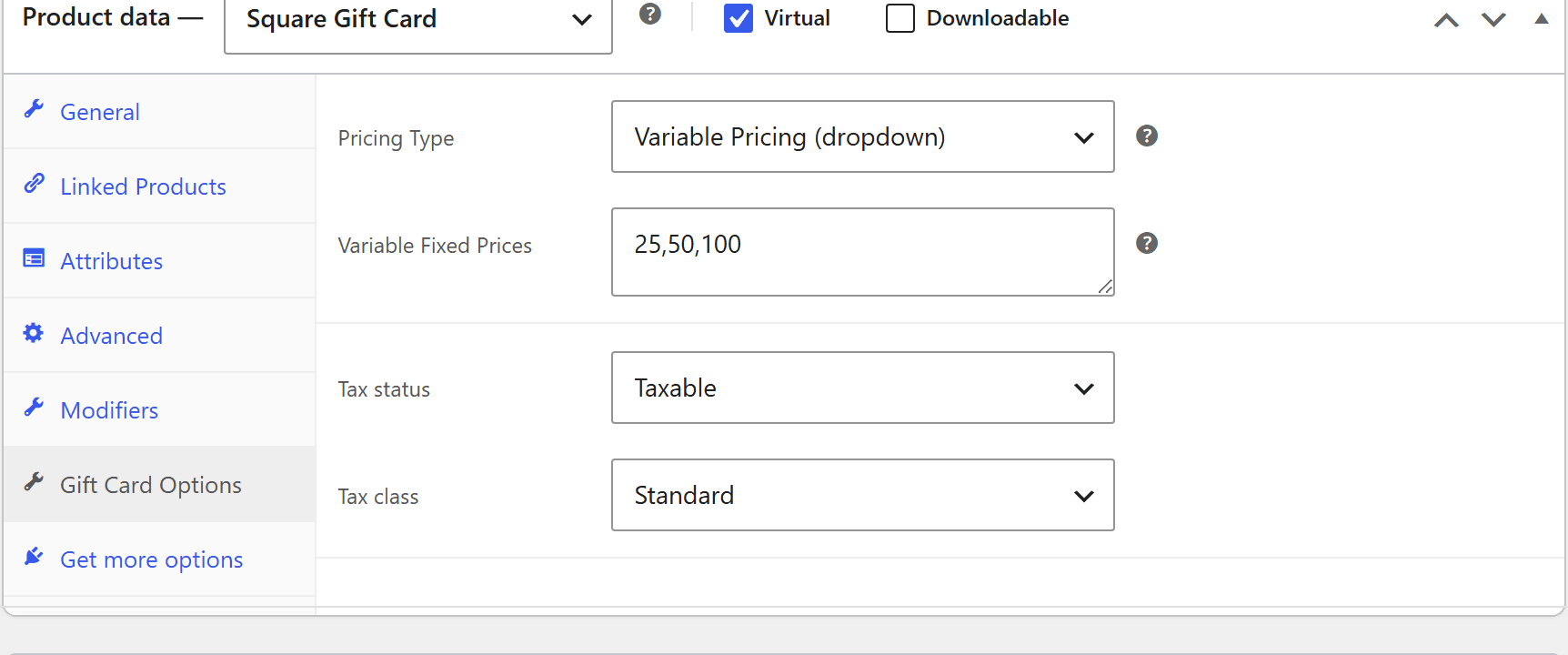
One set amount — e.g. a $50 gift card.
Best for simple or promotional offerings.
The tab also carries the product's tax status and class — many jurisdictions don't tax the purchase of a gift card itself (tax applies when it's spent), so set this to match your local rules.
(since 10.2.0) An Allow reloading checkbox on the same tab lets customers add funds to an existing Square gift card from this product, instead of always buying a new card. See Reloading an existing card.
What buyers see
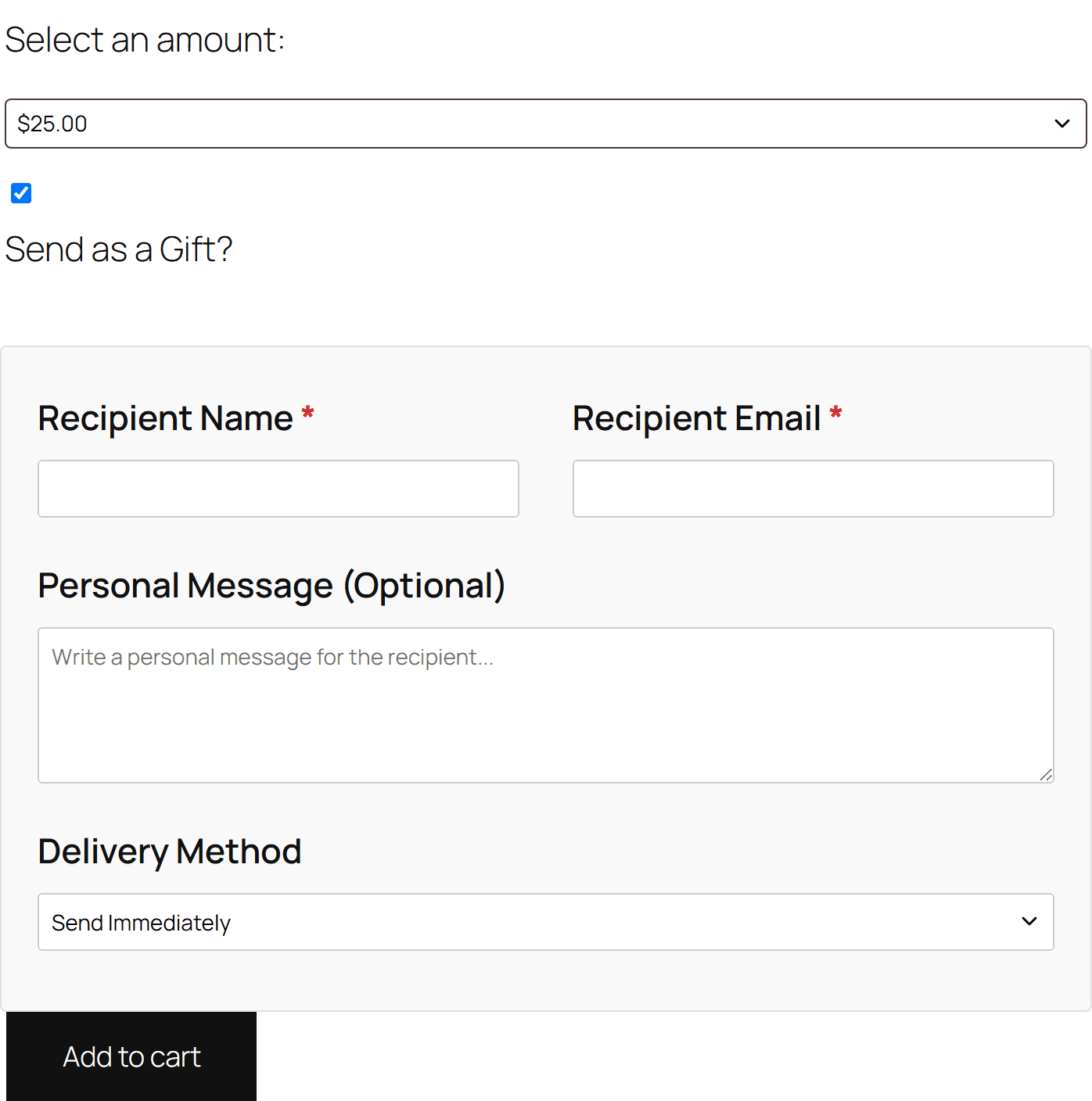
- The amount picker matching your pricing type (dropdown, open field, or none for fixed).
- An optional "Send as a Gift?" toggle. Left unticked, the buyer receives the card themselves. Ticked, it reveals:
- Recipient name and email (required) — the card is emailed to the recipient instead
- An optional personal message, included in the email
- Delivery method — Send Immediately, or Schedule for Later with a date picker (today or later)
Delivery
When the order is paid, the plugin creates and activates a real gift card in Square, loaded with the purchased amount — it appears in Square Dashboard → Gift Cards immediately. The card number is then emailed to the recipient (or the buyer), with the balance and any personal message.
- The email is a standard WooCommerce email (WooCommerce → Settings → Emails → Square Gift Card), so you can restyle and reword it like any other.
- Scheduled deliveries go out on the chosen date.
- Need to send it again? Every gift card order has a Resend Gift Card Email entry in its Order actions dropdown.
Reloading an existing card
(since 10.2.0) With Allow reloading ticked on the gift card product, the product page offers two purchase modes:
- Buy a new gift card — the normal flow above.
- Add funds to an existing gift card — reveals a Gift card number field. The buyer enters the number from a card they (or someone else) already hold; the plugin verifies the card exists in Square before it can be added to the cart.
When the order is paid, the plugin creates a Square LOAD activity against that card instead of issuing a new one — the purchased amount is added to the existing balance, funded by the order's line item, and the order notes record the amount loaded and the card's new balance. No gift card email is sent for reloads (the recipient already has the card); the Send as a Gift fields are hidden in reload mode.
Reloads work with any pricing type — fixed, variable, or open amount.
Redemption
- Online: the customer enters the card number in the Gift Card box at checkout. Partial coverage is handled automatically — the gift card pays what it can and the customer's card covers the rest, on the same Square order.
- At your POS: it's a normal Square gift card — scan or key it in at the terminal, same balance.
Two interactions worth knowing: gift card orders always charge immediately — the Authorize only payment action doesn't apply when a gift card is part of the payment — and a gift card product in the cart also captures immediately, so the card can be issued and emailed right away.
Troubleshooting
The Gift Card box isn't showing at checkout
- Confirm Enable Square Gift Cards is ticked in the gateway settings and the Square gateway itself is enabled.
- The box renders on both the classic checkout and the Blocks checkout — if your theme heavily customises the order review table, check for template overrides.
The gift card email didn't arrive
- Check the recipient's spam folder, and verify the recipient email on the order item.
- For scheduled deliveries, remember it sends on the chosen date, not at purchase.
- Use Order actions → Resend Gift Card Email on the order to send it again.
The card isn't in Square
The card is created and activated when the order is paid. If the payment succeeded but the card is missing, check the order notes for a Square error — and confirm gift cards are enabled on your Square account.
A card is declined at checkout
- The balance may be zero or lower than expected — all redemptions (online and POS) draw from the same Square balance, so check it in Square Dashboard → Gift Cards.
- Confirm the number was typed exactly as it appears in the email.